

The lowest price in the KVM 2.0 line
The same USBridge KVM OS, client apps and lifetime license as the other kits, in a finished device with a screen, starting at $69.
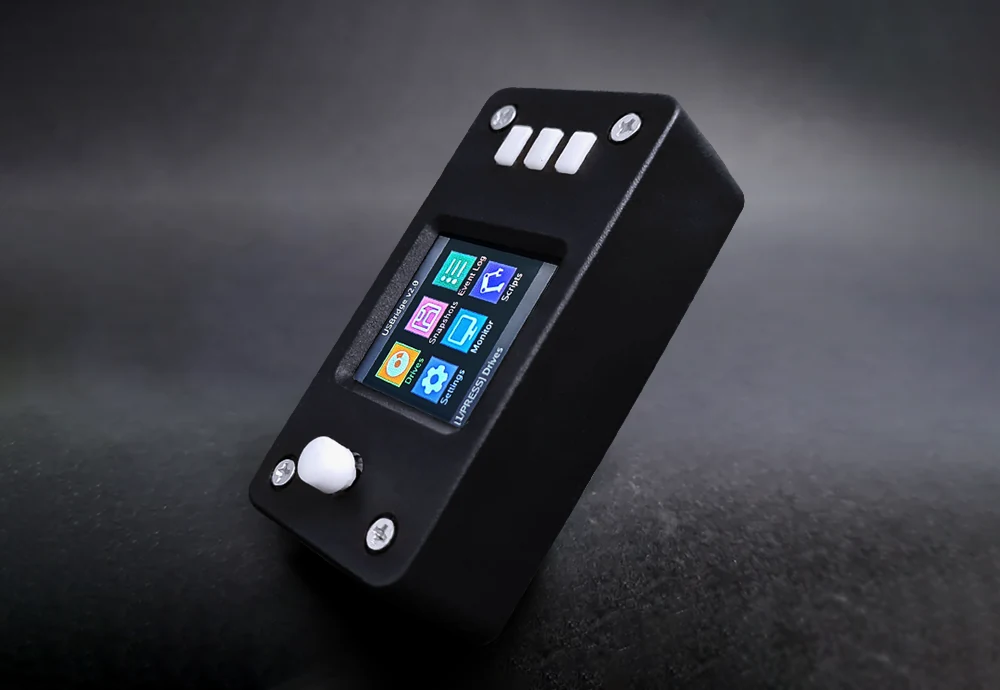
A ready-to-use IP-KVM built on the Walnut Pi ZeroW in a black case with a live screen. It captures video over USB 2.0, which makes it a good fit for BIOS access, server setup and everyday remote administration. Comes with a pre-flashed MicroSD card with a lifetime USBridge OS license included.
Lifetime USBridge OS license included
HDMI cable from the computer to the video capture dongle on the KVM.
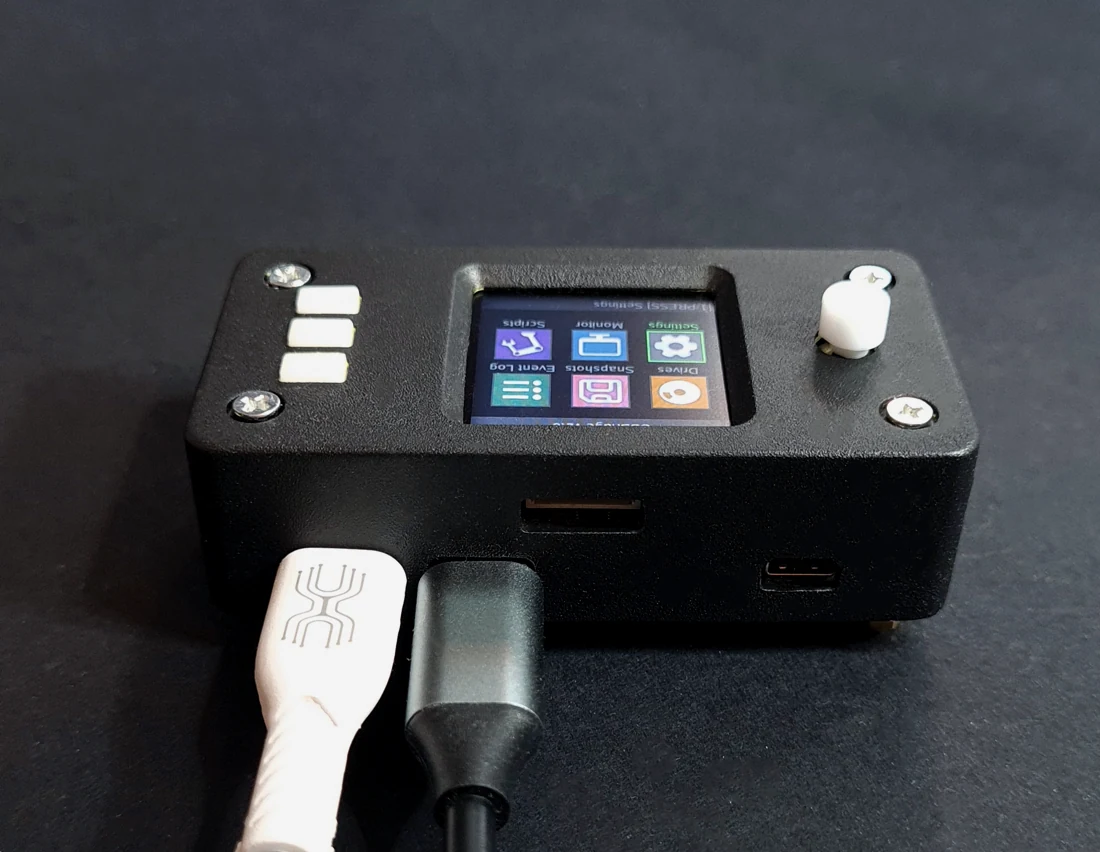
The same USBridge KVM OS, client apps and lifetime license as the other kits, in a finished device with a screen, starting at $69.
Video capture runs over the USB 2.0 bus, so latency is higher and the frame rate lower than on the USB 3.0 kits. It is more than enough for BIOS access, server setup and everyday administration. The board is an Allwinner H618 with four Cortex-A53 cores at 1.5 GHz.
The IP address, network status and system metrics are visible at a glance, right on the case. Change settings on the device itself with the joystick and three buttons, no laptop needed.
No soldering and no 3D-printed case. You get a finished device: Walnut Pi ZeroW in a case, a pre-flashed MicroSD card and an HDMI capture dongle. Take it out of the box and connect it in minutes.
Onboard Wi-Fi on both 2.4 and 5 GHz lets you place the KVM wherever there is a signal, with no cable to the router. Need a wire? Any USB hub with an Ethernet port adds it.
A Btrfs file system with instant read-only snapshots to roll back to. One-click over-the-air updates and a lifetime license with no subscription.
Lite costs $69 and runs the same software as every KVM 2.0 kit. Here is how it compares with other affordable IP KVMs.
JetKVM Mini costs $39 and handles basic out-of-band access well, but it is built on an ESP32-P4X microcontroller, a much weaker processor than the quad-core Allwinner H618 in Lite. For $69, USBridge KVM 2.0 Lite adds a 1.3-inch IPS screen and joystick on the case, Moonlight support, gamepad pass-through, ISO, IMG, VDI and VMDK images and read-only Btrfs snapshots. Video runs over USB 2.0, so the frame rate is lower than on the USB 3.0 kits.
Luckfox PicoKVM (RV1106) is another affordable remote KVM over IP with its own stock firmware, and the version with a screen costs about €88 (around $90). Lite comes at $69 with a screen in a black case and the USBridge OS stack: native clients for Windows, macOS, Linux, iOS and Android, Moonlight streaming, Tailscale built in, over-the-air updates and a lifetime license with no subscription.
Lite is built on the Walnut Pi ZeroW and captures video over USB 2.0. Latency is higher and the frame rate is lower than on the USB 3.0 kits. For BIOS access, server setup and everyday remote administration it is more than enough.
Not out of the box: Lite comes without the ATX board. It is compatible with the Power Control Board ($14.50), which you can add to your order: with it you can power on, power off normally or by force, and reset the computer. Or choose KVM 2.0 Full, which comes with the board and wires.
The board has dual-band Wi-Fi (2.4 and 5 GHz) and Bluetooth 5.0. For a wired connection, plug in a USB hub with an Ethernet port: almost any hub works. The hub is not included.
Lite has a built-in 1.3-inch screen, so you can do the whole setup on the device: pick a Wi-Fi network with the joystick and buttons, and the IP address appears on the screen once the KVM joins your network. You can also set it up from a browser: plug the USB-C cable into your computer, and it gets a virtual USB network adapter (its own internet connection stays untouched) with the KVM reachable at 10.55.0.1. Open http://10.55.0.1 for the pairing QR code, the direct connection link and device key, and the Wi-Fi settings.
Native desktop apps for Windows, macOS (Apple Silicon) and Linux, mobile apps for iOS and Android, the web client at web.usbridge.io in any browser, and any Moonlight client for low-latency 1080p 60 FPS streaming.
Yes. Tailscale is built in, so you can connect from anywhere without port forwarding or a static public IP.
Yes. USBridge KVM OS updates over the air from the client or the web interface, with no need to reflash the MicroSD card.
No. The box has the KVM in its case and the HDMI-to-USB capture dongle. Any standard HDMI cable from the computer to the capture dongle will do. The USB-C cable to the computer is not included either.
Standard and Full run on the Radxa Zero 3W and capture video over USB 3.0 for 1080p at 60 FPS. Lite runs on the Walnut Pi ZeroW with USB 2.0 capture. Full adds the ATX board for remote power on, power off and reset.
KVM 2.0 is going through CE certification for Europe now. We will publish the certificate as soon as we have it.
No. The USBridge KVM OS license is included with the device and lasts for life, with no subscription and no hidden fees.
The KVM takes its power from the USB-C cable to the host. When you restart or shut down the host computer, that port loses power and the KVM reboots too. To keep it online, use a USB-C power and data Y-splitter cable (also called a power/data separator).
These splitters cost about $3–5 on Amazon, AliExpress or at a local electronics store: search for “USB-C power and data Y-splitter”.
Use a standard 5V adapter. Do not use high-voltage USB-PD fast chargers.
We'll write about new devices and firmware updates.
By subscribing you accept the privacy policy. You can unsubscribe at any time: write to kvm@usbridge.io.