

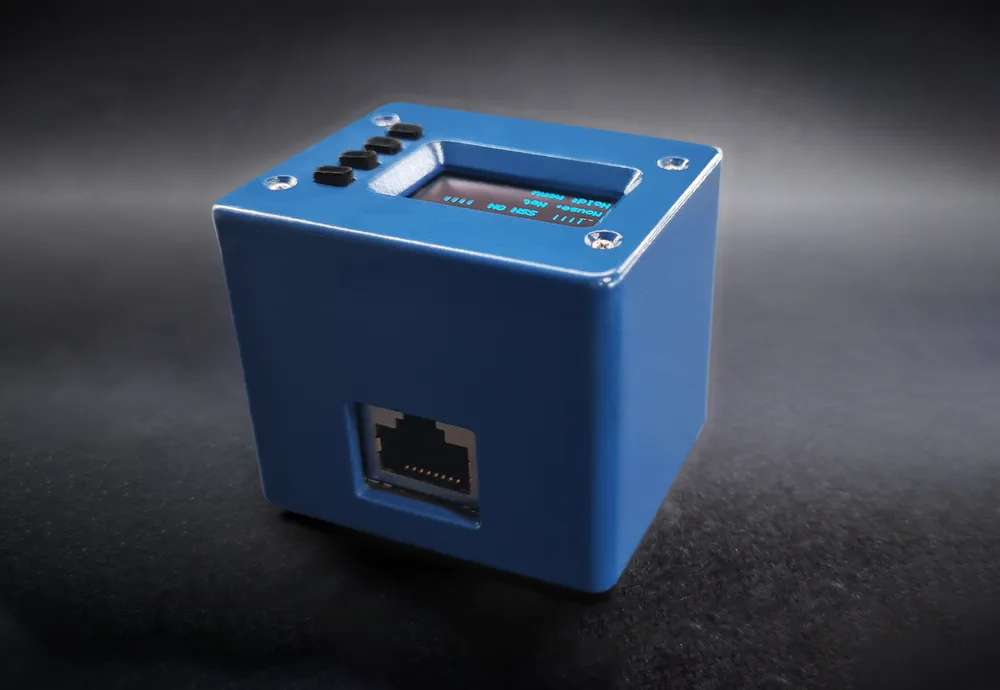
USBridge Nano compact IP KVM with a status screen and Ethernet, in its case

USBridge Nano

The most compact remote IP-KVM in the lineup, built on the Sipeed NanoKVM (SG2002) platform. Features a dedicated status screen, physical control buttons, a pre-flashed MicroSD card with a lifetime USBridge OS license included, and wired Ethernet for lag-free remote server management. Ready out of the box, with no extra software fees.

$89

Lifetime USBridge OS license included

  • Ships in 2–3 daysDispatched within 2–3 business days, tracked

Technical specifications

Board
Sipeed NanoKVM (SG2002)
Processor
RISC-V C906, 1 core, 1 GHz
Memory
256 MB DDR3
Video
HDMI capture, 1080p 60 FPS
Video encoding
H.264, H.265
Control
USB HID keyboard and mouse, virtual ISO drive, gamepads
Audio
Audio output and microphone in both directions
Network
100 Mbit Ethernet port
Remote access
USBridge Client, web interface, Tailscale P2P, Moonlight
Power
USB-C
Power consumption
0.2 A at 5 V
Screen
128×64
Dimensions with case
49×41×41 mm
System
USBridge OS on the included MicroSD card, over-the-air updates
License
Lifetime USBridge OS license included, pre-activated on the MicroSD card (no subscription)

Set up in 3 steps

ComputerUSBridge NanoUSBridge192.168.1.42USB-CLANHDMIUSBRouterUSBridge Client

HDMI

HDMI cable from the computer to Nano.

Wiring & firmware guide on GitHub

What's in the box

  • Nano KVM in a case with a built-in screen and buttons
  • Pre-installed MicroSD card with ready-to-use USBridge OS
  • Lifetime USBridge OS license included (pre-activated on the MicroSD card, no separate purchase or subscription needed)

What sets USBridge Nano apart

Ultra-compact form factor & hardware screen

At 49×41×41 mm, Nano is the smallest KVM in the lineup. The built-in 128×64 status screen shows the IP address and device status in real time, with onboard control buttons next to it. A compact RISC-V KVM for tight server racks, homelabs and desktop setups.

Ready out of the box

The MicroSD card comes pre-flashed with USBridge OS. No manual flashing or compiling: plug in HDMI, USB-C and Ethernet, then pair it in USBridge Client within minutes.

Wired Ethernet stability

A 100 Mbit RJ45 Ethernet port keeps remote access stable and independent of Wi-Fi congestion or interference. An Ethernet IP KVM with a screen that shows its own address.

Budget IP KVM with a full license

The most affordable entry into the USBridge ecosystem at $89. A lifetime USBridge OS license is included, with no subscription and no hidden fees.

USBridge Nano vs. JetKVM Mini, Sipeed NanoKVM & Luckfox PicoKVM

Nano costs $89. Here is what that buys compared with other sub-$100 IP KVMs.

JetKVM Mini

A JetKVM Mini alternative with 60 FPS and audio

JetKVM Mini costs $39 and handles basic out-of-band access well. Its ESP32-P4X captures up to 1080p at 30 FPS, or 720p at 60 FPS. USBridge Nano streams 1080p at 60 FPS, carries audio and a microphone in both directions, emulates gamepads and supports Moonlight streaming for low-latency work. If you need smooth video and sound, not just a BIOS console, Nano is worth the difference.

Sipeed NanoKVM

Sipeed NanoKVM, finished and running USBridge OS

Nano is built on the same Sipeed NanoKVM (SG2002) RISC-V board. A bare board costs less, but it comes with stock firmware and you assemble and set it up yourself. Nano arrives as a boxed product: a case with a screen and buttons, a pre-flashed MicroSD card with USBridge OS, a lifetime license, Moonlight and WebRTC streaming, Tailscale and over-the-air updates.

Already own a NanoKVM? Flash USBridge OS on it
Luckfox PicoKVM

Luckfox PicoKVM vs. USBridge Nano

Luckfox PicoKVM (RV1106) is another affordable remote KVM over IP with 1080p capture and its own stock firmware. Nano adds the USBridge OS stack on top of the hardware: native clients for Windows, macOS, Linux, iOS and Android, Moonlight streaming, two-way audio, gamepad emulation, and read-only Btrfs snapshots for ISO images and backups.

USBridge Nano owner reviews

Your review

Rating
What you have
Not published, only for checks

By sending, you agree to the privacy policy

Frequently asked questions

Does USBridge Nano get over-the-air (OTA) updates?

Yes. USBridge OS on Nano updates over the air: new versions install from the client or the web interface, with no need to take out and reflash the MicroSD card. Your files, ISO images and snapshots on the storage volume stay in place.

Can I connect to Nano with a Moonlight client?

Yes. Nano supports the Moonlight protocol, so any Moonlight client can connect to it for low-latency 1080p 60 FPS video with keyboard, mouse and gamepad input. Pair it with the Moonlight PIN shown on the setup page at http://10.55.0.1.

How do I set up the network and find Nano's IP address?

Plug the USB-C cable into your computer: it gets a virtual USB network adapter (its own internet connection stays untouched) and Nano is reachable at 10.55.0.1. Open http://10.55.0.1 in a browser for the pairing QR code, the direct connection link and device key, the Moonlight PIN and network settings. On Ethernet, your router assigns Nano an IP address by DHCP. The address is shown at the top of the setup page and on Nano's 128×64 screen after boot.

Which apps can I use to control Nano?

Native desktop apps for Windows, macOS (Apple Silicon) and Linux, mobile apps for iOS and Android, and the web client at web.usbridge.io in any browser. The desktop app gives the best video performance thanks to hardware decoding.

Can I reach Nano from outside my home network?

Yes. Tailscale is built in, so you can connect from anywhere without port forwarding or a static public IP.

Does Nano need a power adapter?

No. The USB-C cable from Nano to the computer powers it and carries the keyboard, mouse and virtual drive. You only need HDMI, USB-C and Ethernet.

Can Nano turn my computer on and off (ATX power control)?

No, Nano has no ATX power control. For remote power on, power off and reset, choose USBridge KVM 2.0 Full: it comes with an ATX board that connects to the motherboard power and reset pins.

Is the license a subscription?

No. The USBridge OS license is lifetime and bound to your unit's hardware serial number. You can move to a larger MicroSD card at any time: flash USBridge OS onto it, and the license is validated again automatically once Nano is online.

Not ready to buy yet? Stay in touch.

News by email

We'll write about new devices and firmware updates.

By subscribing you accept the privacy policy. You can unsubscribe at any time: write to kvm@usbridge.io.

Discord community

Ask questions and see how others set up their KVM.

Go to Discord
Wiring & firmware guideSetup steps, first connection, SSH access and the 3D-printable case for USBridge Nano, on GitHub.